
Documentation
Blueprint
Translated from the Portuguese original. Labels from the CLI and the admin panel stay in Portuguese, as you will see them.
Numbered technical sheets on graph paper, with dimensions and a title block — engineering and precision.
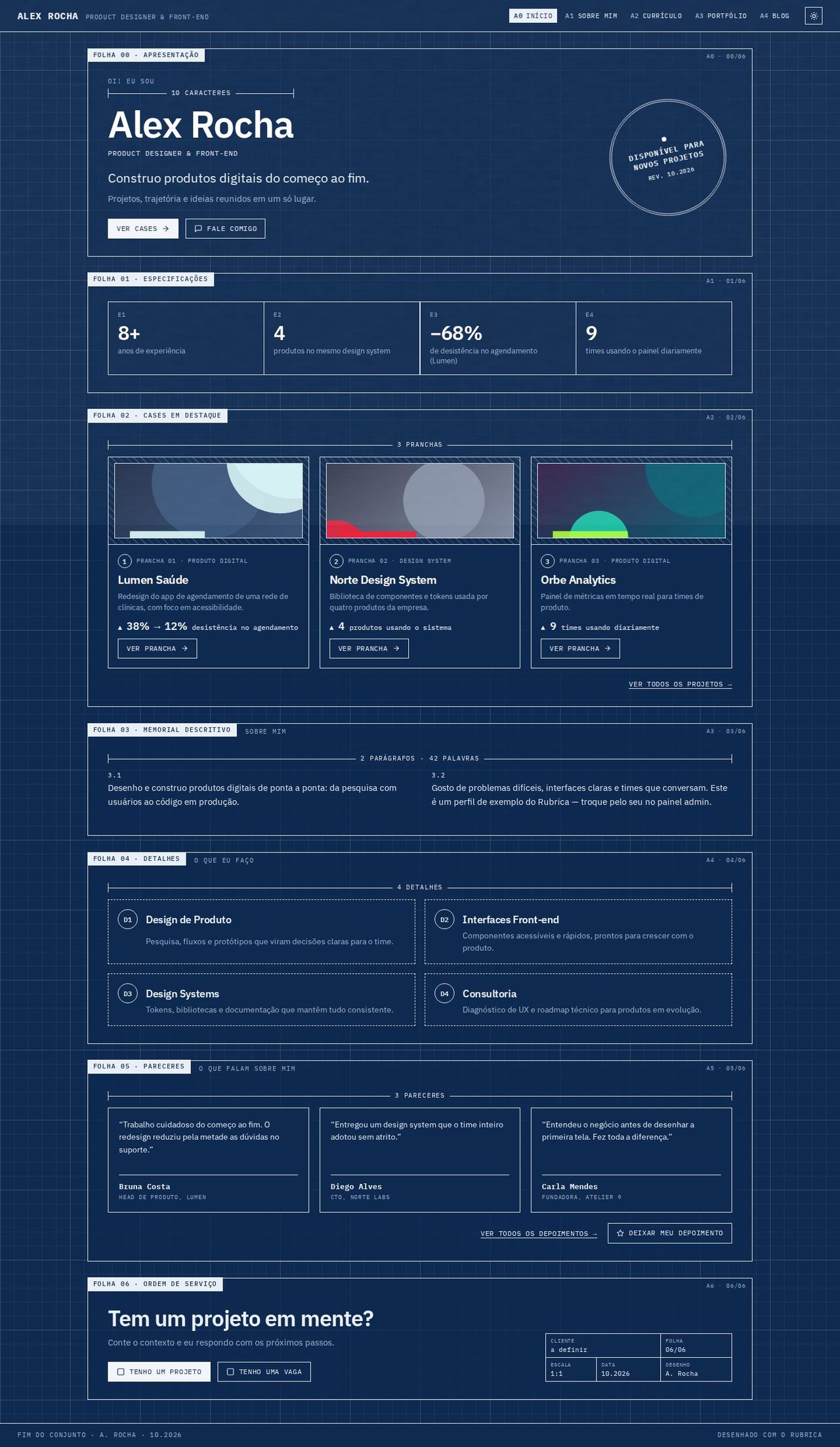
Screenshots with the Cianotipia scheme, dark mode (the recommended one), at 1440px.
Concept
Each section is a technical sheet with a frame, on graph paper (a fine 24px grid and a strong 120px grid, made with linear-gradient from --text). In the corner of each sheet sits the "FOLHA 0X · TÍTULO" (SHEET 0X · TITLE) tag (it is the section's h2) and, on the other side, the "A2 · 02/06" reference. The sheets number themselves: when a section disappears for lack of data, the following ones move up.
The vocabulary of technical drawing becomes content:
- Dimension lines measure elements with real information: the number of characters in the name, "3 PRANCHAS" (3 PLATES), "2 PARÁGRAFOS · 42 PALAVRAS" (2 PARAGRAPHS · 42 WORDS), "2019 — 2026 · 7 ANOS" (7 YEARS).
- Circled numbers with captions number plates, experiences, details and notes.
- A title block (title table: project, sheet, scale, date, drawing) closes each page.
Golden rule: title blocks, dimensions and circled numbers always stay in the document flow, never positioned on top of another element. That's why they don't cover text at any width.
- Recommended fonts: IBM Plex Sans (main) and IBM Plex Mono (mono). The mono is the layout's voice (tags, labels, buttons); the sans handles headings and paragraphs.
- Recommended appearance:
cianotipiascheme, dark mode,papertexture. - Colors: only the scheme variables. Colored text uses
--blueprint-ink(a mix of--primaryand--text), readable even with light primaries like Concreto's yellow. Title block and circle outlines use--blueprint-mark. - Template files:
Layout.tsx,BlueprintHeader.tsx,BlueprintShared.tsx(stylesheet, pt-BR/en-US strings and the piecesSheet,Dim,Num,TitleBlock,PageTitleBlock,Hatch) and the 5 pages inpages/.
Global structure
- Fixed header with the name, the specialty in mono and the navigation as sheet codes: A0 INÍCIO, A1 SOBRE MIM, A2 CURRÍCULO, A3 PORTFÓLIO, A4 BLOG (Home, About me, Resume, Portfolio, Blog). Items from disabled plugins disappear and the codes stay in sequence. The current page is inverted (
aria-current="page"). The<ColorModeToggle />sits on the right. - "Pular para o conteúdo" (Skip to content) link for the keyboard, and a dashed visible focus on all controls.
- Footer with "Fim do conjunto · A. Rocha · 10.2026" (End of set).
- Shared pages (post, case, testimonials, proposal, checkout) appear inside a plain sheet, on the same paper.
Pages
Home
- Folha 00 · Apresentação (Sheet 00 · Introduction): "Oi! Eu sou" (Hi! I'm), the dimension with the number of characters in the name, the name (
h1), the role, the value statement (home.hero.headline), the description and the "Ver cases" (See cases) and "Fale comigo" (Talk to me; opens the form) buttons. With availability on, a rotated circular stamp with the availability text and "REV. mês.ano" (month.year), in its own column. - Especificações (Specifications): the highlight numbers (up to 4) as an E1–E4 table. It disappears when there are no numbers.
- Cases em destaque (Featured cases): a "3 PRANCHAS" dimension and the cases as plates: hatched area with the framed image, "① PRANCHA 01 · categoria" caption, title, description, the first metric with ▲ and "VER PRANCHA →" (SEE PLATE; the whole card is clickable).
- Memorial descritivo (Descriptive memorandum): the "about" text in 2 columns, numbered paragraphs (3.1, 3.2…) and result numbers highlighted.
- Detalhes (Details): the services as D1–D4 in dashed boxes.
- Pareceres (Reviews): up to 3 testimonials with a signature line, "Ver todos os depoimentos" (See all testimonials;
testimonialsplugin) and "Deixar meu depoimento" (Leave a testimonial;testimonials-intakeplugin). - Ordem de serviço (Work order): "Tem um projeto em mente?" (Have a project in mind?), the checkboxes "Tenho um projeto" (I have a project) and "Tenho uma vaga" (I have a job opening) and the title block (client "a definir" (to be defined), sheet, scale, date, drawing). With the form turned off, the page closes with the title block only.
Resume
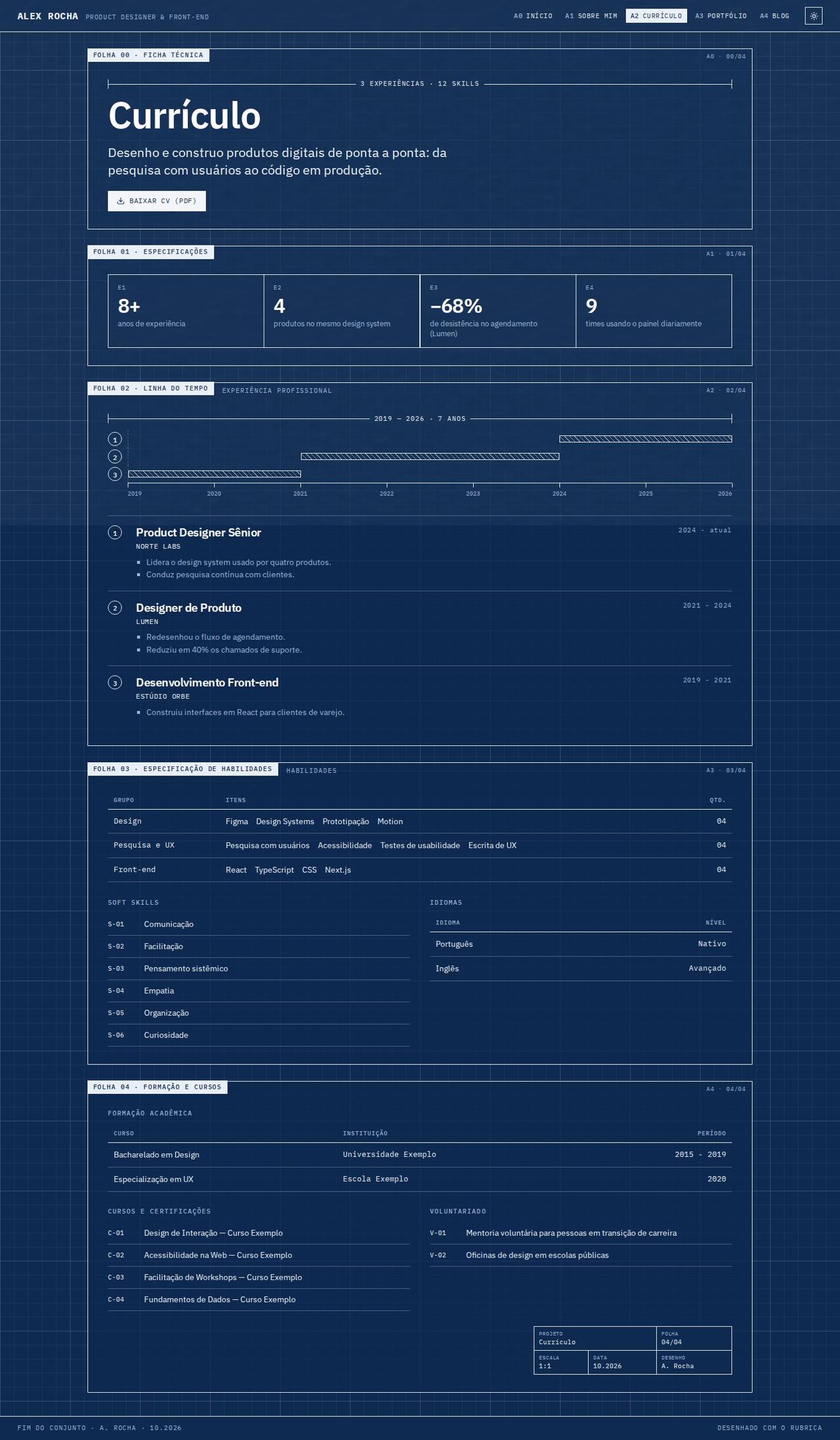
- Ficha técnica (Technical data sheet): a dimension with the total of experiences and skills, title, summary (first paragraph of "about") and "Baixar CV (PDF)" (Download CV).
- Especificações: the same numbers as on Home.
- Linha do tempo (Timeline): a dimensioned axis with the years marked and a hatched bar per experience, with a circled number; below it, the legend with role, company, period and description. Older experiences sit behind "ver experiências anteriores" (see earlier experience). The axis only appears when the periods have a year ("2021 - 2024", "2024 - atual").
- Especificação de habilidades (Skills specification): GRUPO | ITENS | QTD. (GROUP | ITEMS | QTY.) table ("Grupo" field in the admin, no numeric levels), soft skills coded S-01… and a languages table.
- Formação e cursos (Education and courses): education table, courses and certifications (C-01…) and volunteering (V-01…). Closes with the title block.
Portfolio
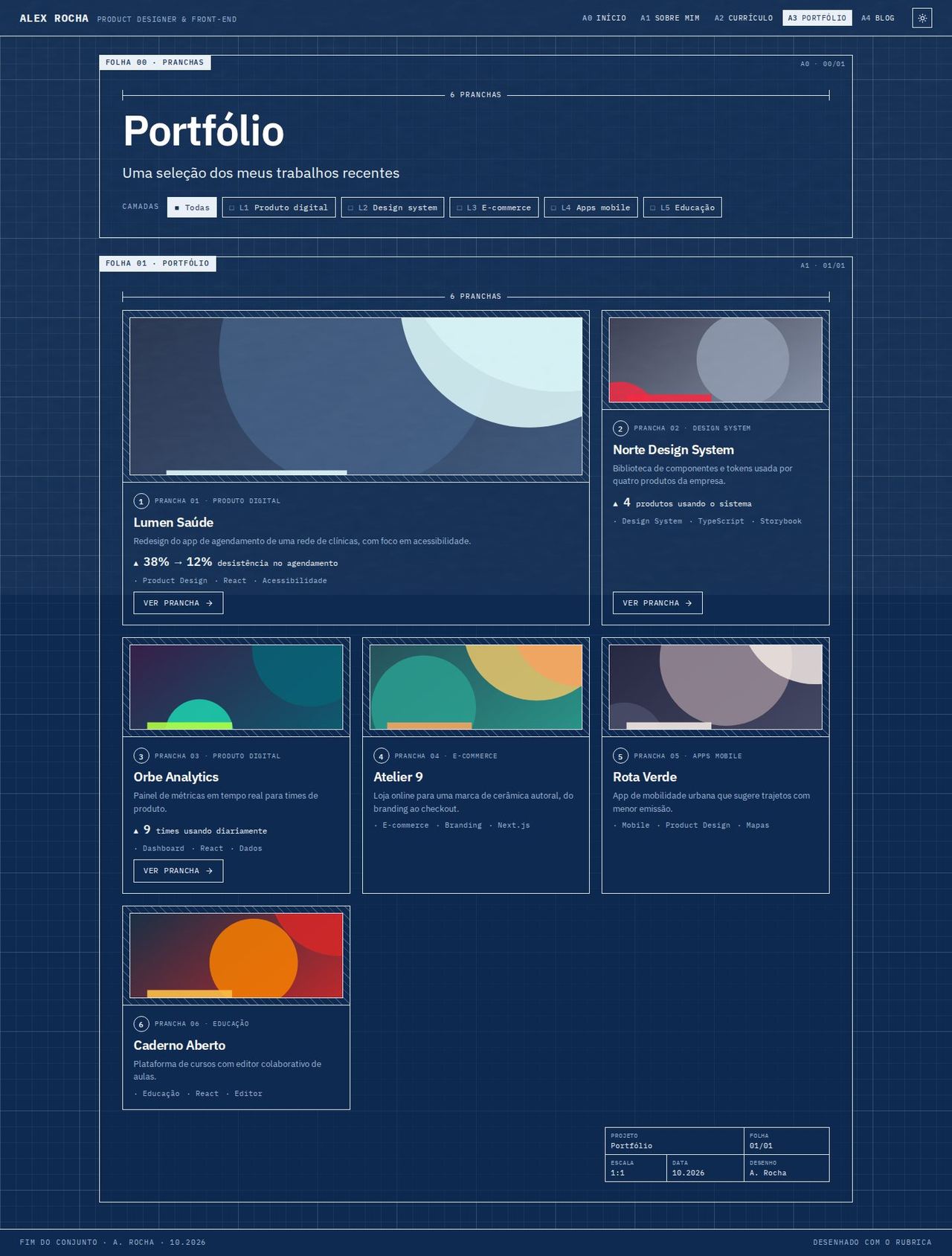
- Pranchas (Plates): a dimension with the number of projects, title and the categories as toggleable CAMADAS (LAYERS) ("■ Todas" (All), "□ L1 Produto digital"…), buttons with
aria-pressed. Choosing a layer isolates its projects; clicking again goes back to all. Without categories, the layers disappear. - Grid of numbered plates: the first spans 2 columns (featured), the others sit in 3 columns. Each plate shows caption, title, description, the case's first metric with ▲, up to 4 tags and only one action: "VER PRANCHA →" (SEE PLATE) when there is a case, otherwise "VER PROJETO ↗" (SEE PROJECT; demo or code).
About
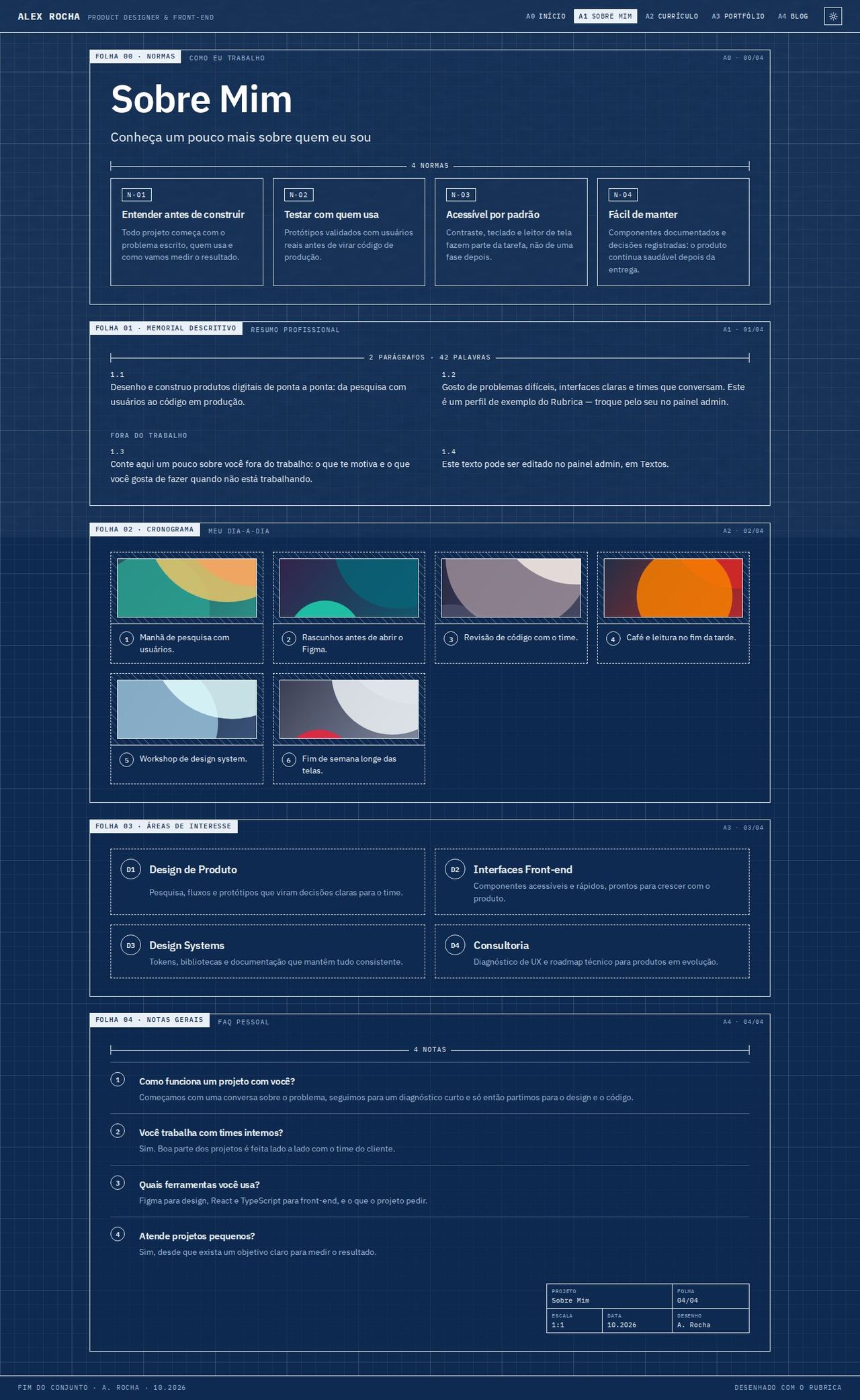
- Normas (Standards): opens with the title and "Como eu trabalho" (How I work): the principles as standards N-01, N-02…. Without principles, the sheet is just the introduction.
- Memorial descritivo: the professional summary in 2 numbered columns and, after it, "Fora do trabalho" (Outside work; personal text).
- Cronograma (Schedule): the day to day in numbered steps, with each item's image in the hatched area.
- Áreas de interesse (Areas of interest): the Home services as D1, D2…
- Notas gerais (General notes): the FAQ as numbered notes (question and answer). Closes with the title block.
Blog
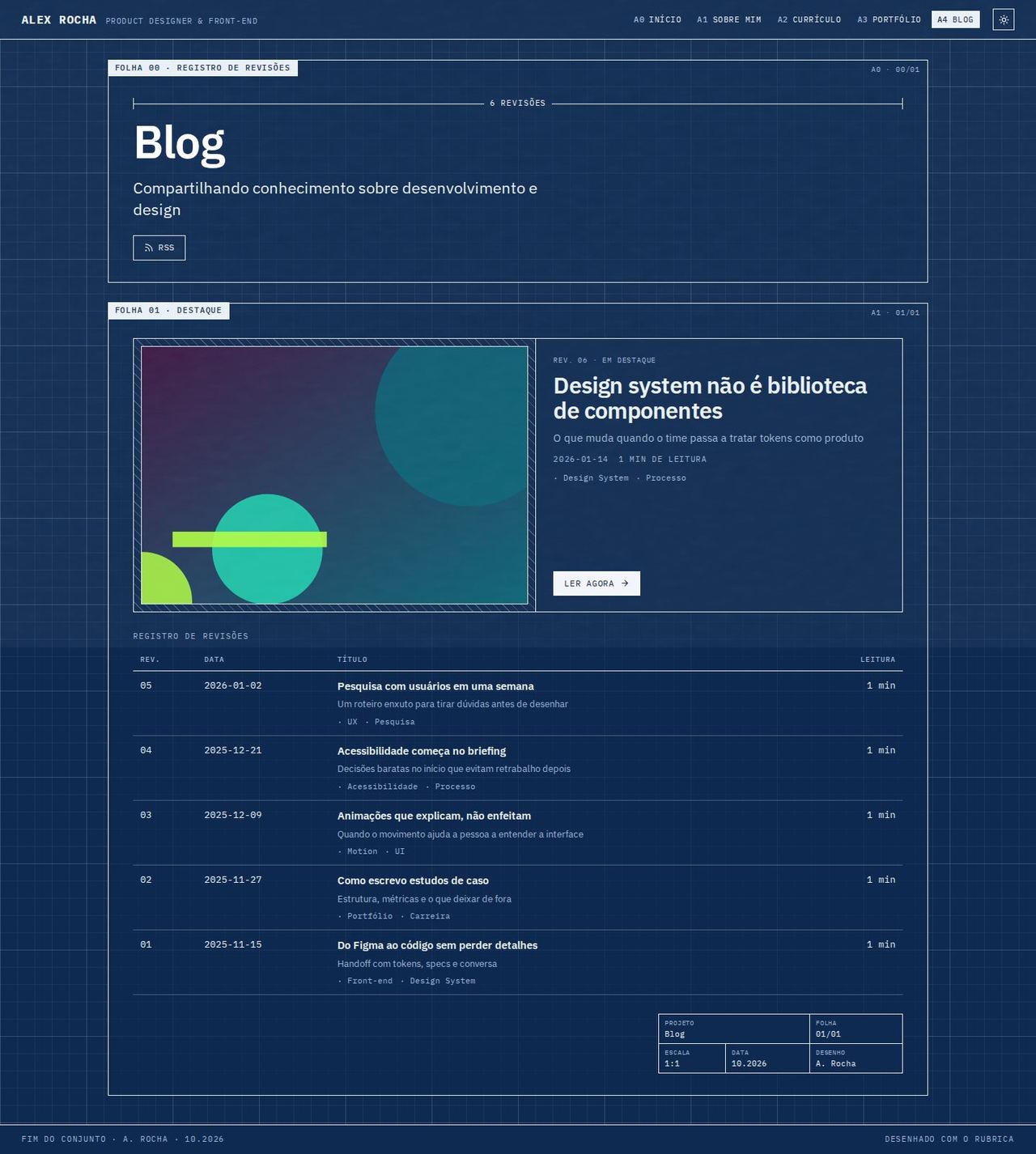
- Registro de revisões (Revision log): a dimension with the number of posts, title, subtitle and the RSS button (
/rss.xml). - Destaque (Featured): the featured post (or the most recent) as a large plate: hatched image, "REV. 06 · Em destaque" (Featured), title, subtitle, ISO date, reading time, tags and "Ler agora" (Read now).
- REV | DATA | TÍTULO | LEITURA table (REV | DATE | TITLE | READING) with the other posts (revisions numbered from oldest to newest), subtitle and tags under the title, each title linking to
/blog/<slug>. With no posts, "Nenhum artigo publicado ainda" (No articles published yet) appears.
Mobile
- The sheets stack in one column; the header is no longer fixed and the navigation wraps into lines.
- The circular stamp moves below the buttons, smaller; the "A2 · 02/06" reference disappears.
- The dimensions shrink; the resume axis keeps only the first and last year.
- The data tables (skills, education, blog revisions) become lists: each row is a block and each cell carries its own label.
Known limitations
- The availability text sits inside a 200px circle (150px on mobile): very long texts (more than ~60 characters) get cut.
- The dimensioned axis reads the years from the period text (
2019 - 2021,2024 - atual/present); periods without a year go only into the list, with no bar. - Reading time is estimated at 200 words per minute.
- The layer filter is single-select (it isolates one category), as in the other layouts.
- Full-page screenshots show a band at the window height: it is the global texture layer (
data-texture), which is fixed to the screen.