
Documentation
Desktop Retrô
Translated from the Portuguese original. Labels from the CLI and the admin panel stay in Portuguese, as you will see them.
Each section is a window on the desktop — nostalgia and play.
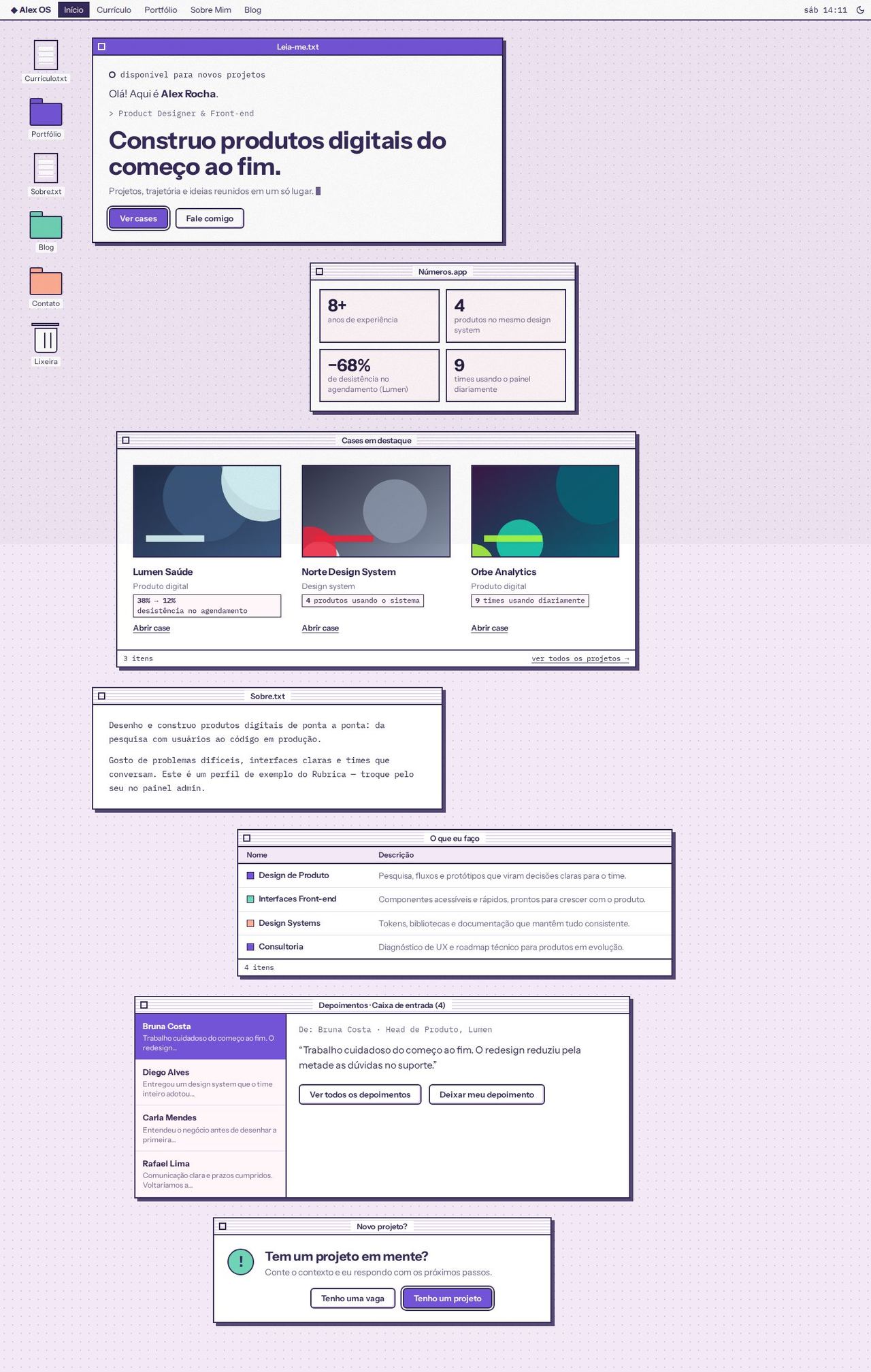
Screenshots use the Sorbet scheme, light mode, grain texture.
Concept
The site becomes a 1998 operating system. The desktop is a dotted background (--subtle with dots in the text color), and each section is a window: a striped title bar (--surface and --line), a decorative close box, a 2px border and a hard, offset shadow. The "focused" window on each page has its title bar in the primary (text in --on-primary).
Buttons imitate the old system's: thick border, slightly rounded corners and an inner bevel. The default button of each box (the one Enter would press) gets the double outline. Body text in the .txt files uses the mono font; titles and interface use the main one.
Golden rule: no element covers text. Windows sit in one column, staggered only horizontally (each has its own width and offset, which shrink until they fit), and never overlap. Smaller windows can sit side by side, in rows that wrap.
- Recommended fonts: Instrument Sans (main) and IBM Plex Mono (mono).
- Recommended appearance:
sorbetscheme, light mode,graintexture. - Template files:
Layout.tsx,DesktopMenuBar.tsx,DesktopShared.tsxand the 5 pages inpages/. - Colors: only the scheme variables; the layout's own variables start with
--desktop-(shadow, dots, hover, icon color, window width and offset).
Global structure
- Menu bar fixed at the top: the "◆
OS" brand (from the profile), the navigation items (the active one in an inverted block), the clock with the real weekday and time, and<ColorModeToggle />. On mobile, the items move into a dropdown menu (☰ button; closes with Esc, a click outside or on navigation) and the clock shows only the time. - Desktop icons in a fixed column on the left: real shortcuts to Currículo.txt, Portfólio, Sobre.txt and Blog (each disappears when its plugin is off), Contato (Contact, opens the form when the contact wizard is on) and the Lixeira (Trash), which is decorative. The current page's icon is selected. On mobile, the icons become a scrollable row below the bar.
- App pages (case, post, testimonials, proposals, payment) go into a generic window with a file title ("Case.doc", "Post.txt"…), with inner padding.
- The layout's own texts (window names, columns, labels) live in
DesktopShared.tsx, in pt-BR and en-US. - Windows "open" with a short stepped animation, and the availability light and the cursor blink; all of this is turned off with
prefers-reduced-motion.
Pages
Home
- Leia-me.txt (Read-me, the focused window): availability light (when on), "Olá! Aqui é Nome." (Hi! This is Name.), the role in mono, the value statement (
home.hero.headline) ash1, the description with a blinking cursor, and the "Ver cases" (See cases; default, double outline) and "Fale comigo" (Talk to me, opens the form) buttons. - Números.app: the highlight numbers (up to 4) in 2×2 boxes. The window disappears with no numbers.
- Featured cases: a folder in icon view with the first 3 projects with a case: thumbnail, title, category, the case's first metric as a tag and "Abrir case" (Open case). A status bar with the count and "ver todos os projetos →" (see all projects).
- Sobre.txt: the "sobre" (about) text in mono, with the highlight numbers underlined in the primary.
- O que eu faço (What I do): the services in a Finder list (Nome / Descrição columns, colored marker).
- Depoimentos · Caixa de entrada (n) (Testimonials · Inbox): a sender list on the left and the open message on the right (clicking switches the message). "Ver todos os depoimentos" (See all testimonials) and "Deixar meu depoimento" (Leave a testimonial) buttons depending on the
testimonialsandtestimonials-intakeplugins. Without thetestimonialsplugin, the window disappears. - Novo projeto? (New project?): a dialog box with the "!" in the accent, "Tem um projeto em mente?" (Have a project in mind?) and the "Tenho uma vaga" (I have a job opening) and "Tenho um projeto" (I have a project; default) buttons. It disappears when the contact form is off.
Resume
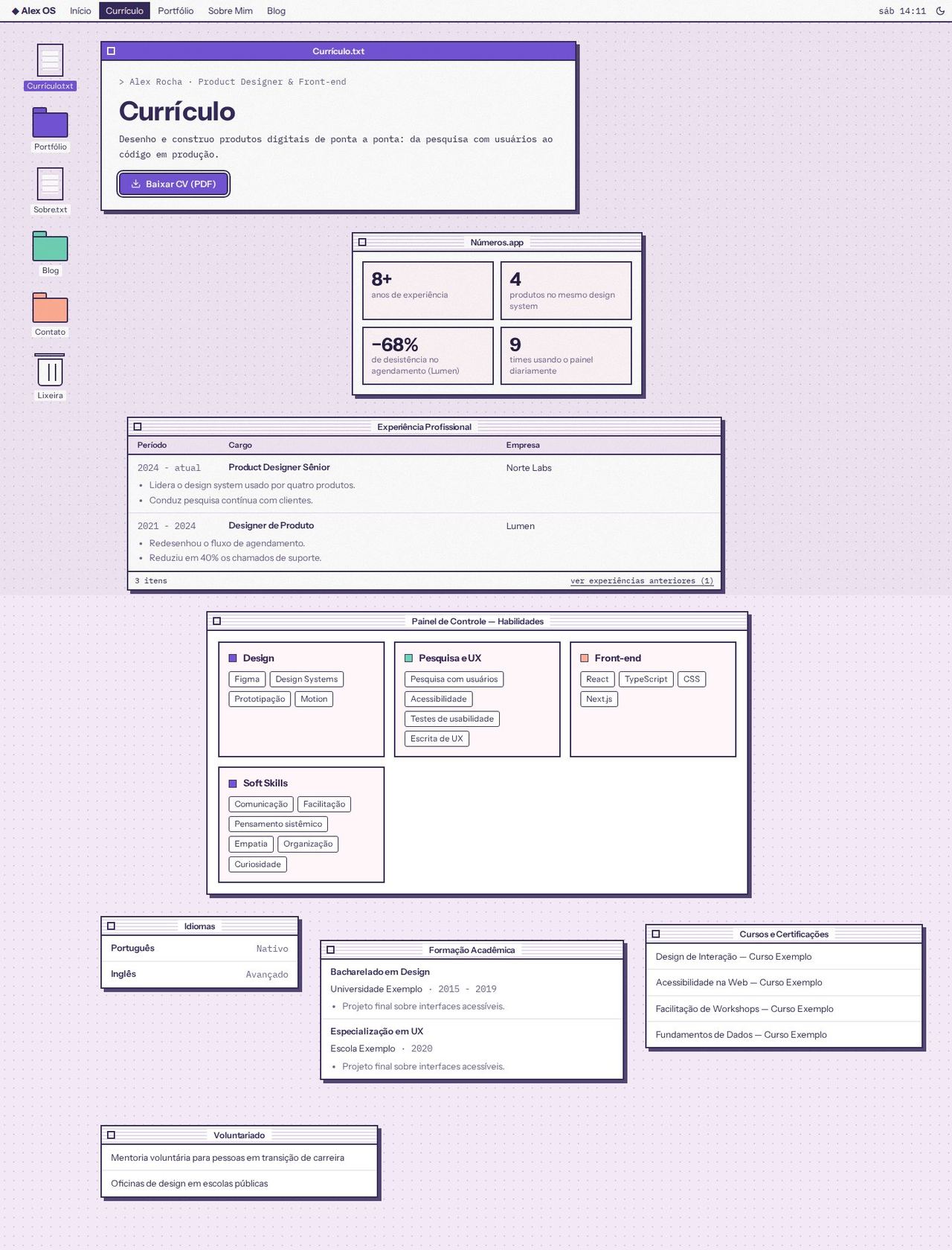
- Currículo.txt (focused): name and role, the title, the summary (first paragraph of "sobre") and the "Baixar CV (PDF)" (Download CV) button.
- Números.app with the same numbers as the home.
- Experiência Profissional (Work experience) in list view (Período, Cargo, Empresa) with each role's bullets below its row. Older ones sit behind "ver experiências anteriores (n)" (see earlier experience), in the status bar.
- Painel de Controle — Habilidades (Control Panel — Skills): one panel per group (the "Grupo" field in the admin), with the skills as tags, no numeric levels; soft skills get their own panel.
- Smaller windows side by side: Idiomas (Languages), Formação Acadêmica (Education), Cursos e Certificações (Courses and Certifications) and Voluntariado (Volunteering). Each disappears when empty.
Portfolio
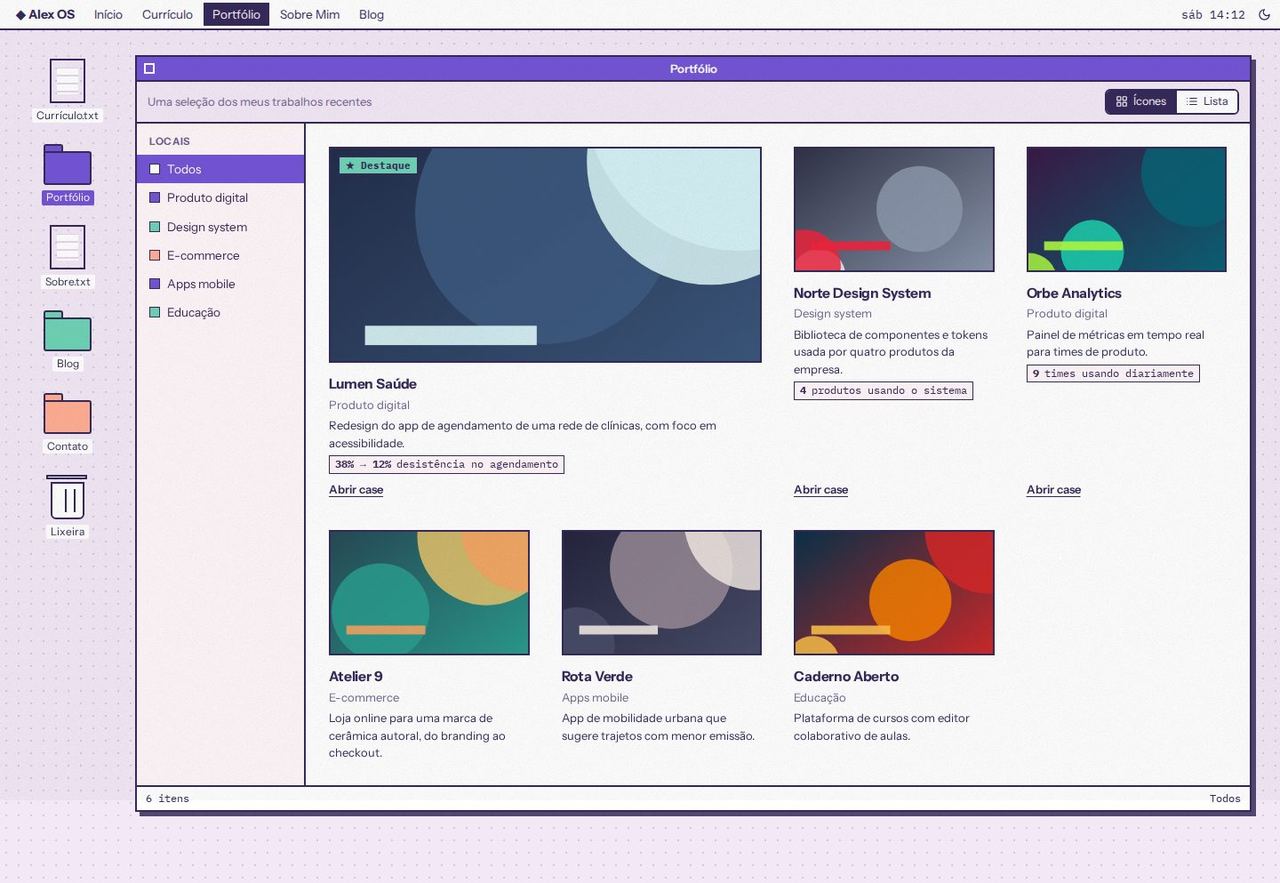
- A single folder window with a toolbar (subtitle and the Ícones / Lista (Icons / List) toggle).
- Categories become the window's "Locais" (Places) sidebar ("Todos" (All) + categories), which filters the projects. With no categories, the sidebar disappears. On mobile, the Places become a scrollable row.
- Icon view: the 1st project spans two columns with the "★ Destaque" badge (when there are more than two); each project shows a thumbnail, title, category, short description, the case's first metric and a single action: "Abrir case" (Open case) when there is a case, otherwise "Abrir projeto ↗" (Open project; demo or repository).
- List view: Nome, Categoria, Resultado and Ação columns (Name, Category, Result, Action).
- A status bar with the count and the active category.
About
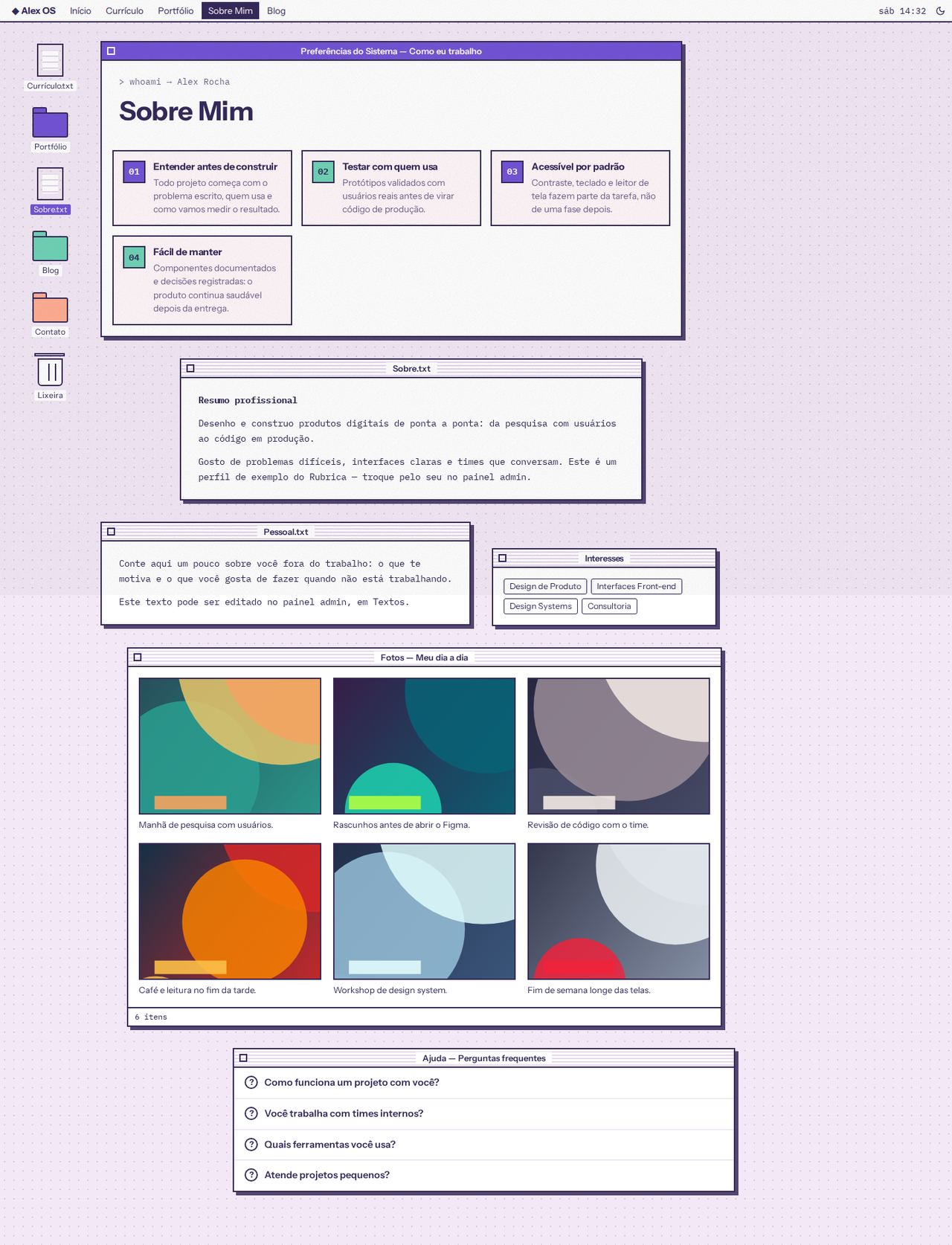
- Preferências do Sistema — Como eu trabalho (System Preferences — How I work; focused): opens the page with the title and the work principles as numbered panels (01, 02…).
- Sobre.txt: the professional summary in mono, with the numbers highlighted. With no principles registered, this window opens the page, focused and with the title.
- Pessoal.txt (the "Fora do trabalho" (Outside work) text) and Interesses (Interests, the home services as tags), side by side.
- Fotos — Meu dia a dia (Photos — My day-to-day): the photos with the caption and tags always visible below each image (no text over the photo).
- Ajuda — Perguntas frequentes (Help — FAQ): the FAQ in collapsible items (
<details>), with a "?" that lights up when opened.
Blog
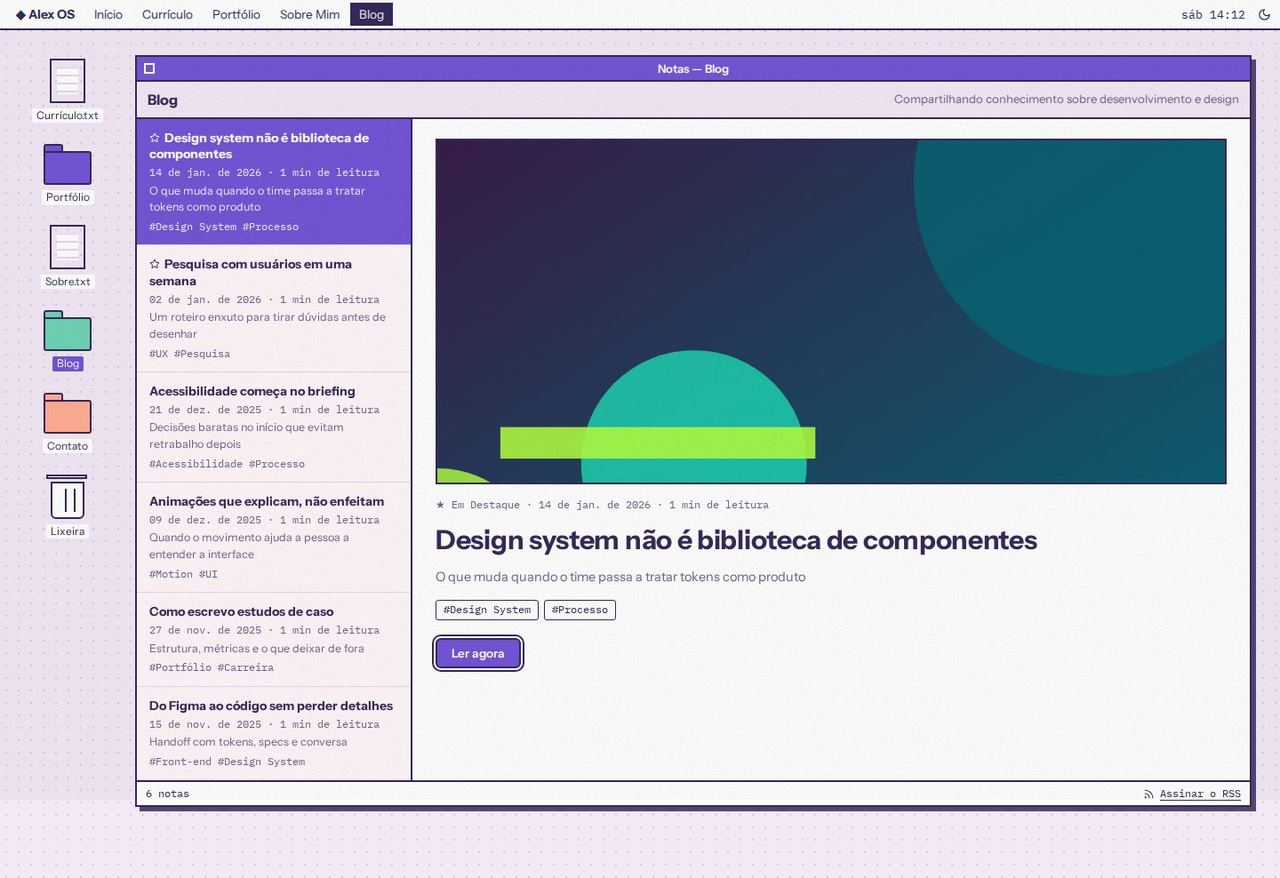
- A notes app: a toolbar with the title and subtitle; on the left, the post list (the featured one first, marked with ★), each with date, reading time, subtitle and tags, linking to
/blog/<slug>. - On the right, the featured post open: cover, date and reading time, title, subtitle, tags and "Ler agora" (Read now).
- A status bar with the note count and the "Assinar o RSS" (Subscribe to RSS) link (
/rss.xml). - On mobile, the open post comes first and the list right below.
Known limitations
- Windows cannot be dragged or closed: the close box and the trash are decorative (
aria-hidden). - Projects with no case and no demo or repository link have no action (same as the other layouts).
- The home inbox shows up to 6 testimonials; the rest are under "Ver todos os depoimentos".
- The size of the "dia a dia" (day-to-day) photos (
span_size) is ignored: they all go into the same grid. - The clock uses the visitor's time and updates every 15 seconds.