
Documentation
Pôster Cinético
Translated from the Portuguese original. Labels from the CLI and the admin panel stay in Portuguese, as you will see them.
Giant type from start to finish, scrolling bands — impact.
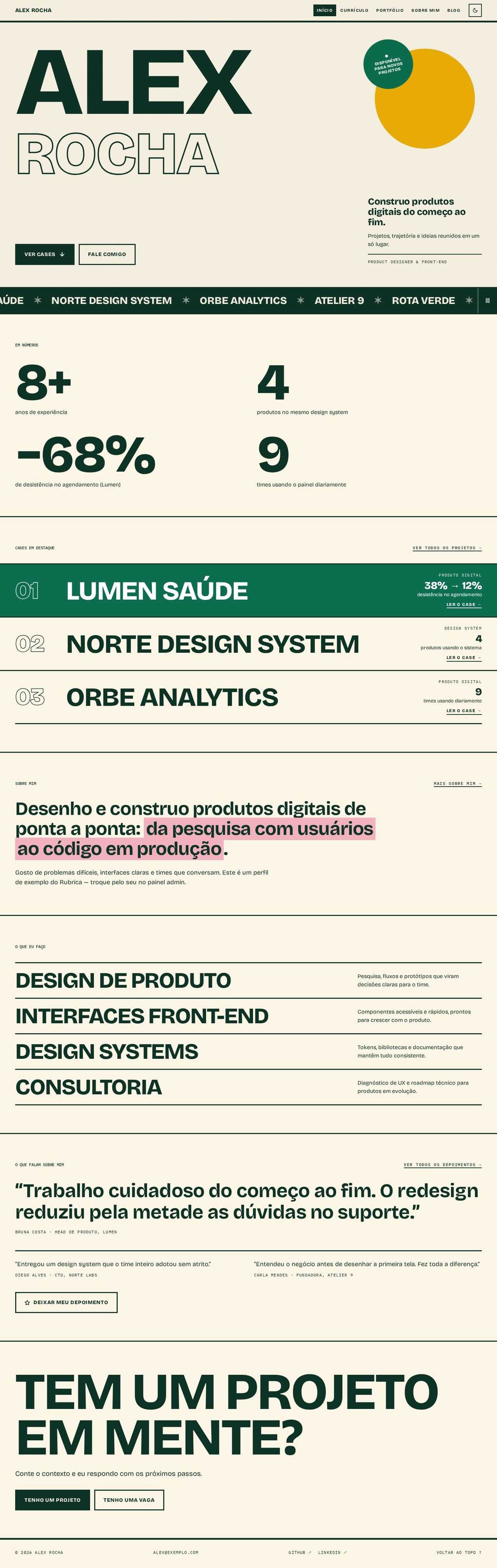
Screenshots with the Tropicália scheme, light mode, grain texture.
Concept
Each page is a poster: almost no images, only type at the heaviest weight, uppercase and thick rules separating the sections. The portfolio owner's name fills the screen width, the surname appears in outline, and projects, services and posts become poster rows with a huge title. A scrolling band with the project names cuts across the page right below the top.
The giant type never overflows the width: each heading is sized by the width of its own block (container units, cqi) and by the length of its longest word, so "Maria Eduarda Albuquerque" or a 40-letter post title fit in 360px with no horizontal scroll. As a last safeguard, words can break (overflow-wrap: anywhere).
Colors, only through the scheme variables:
--text/--bg: the rules, the main buttons (solid block) and the scrolling band (inverted).--primary/--on-primary: the active poster row (the first one, or the one under the mouse or focus), the availability seal and the button shadow on hover.--accent: the color disc at the top (mix-blend-mode: multiplyin light mode,screenin dark mode).--accent-2: the highlighter on statements, mixed with the background (color-mix) so text in--textstays readable in any scheme.Recommended fonts: Bricolage Grotesque (main) and IBM Plex Mono (mono: labels, dates, reading time).
Recommended scheme: Tropicália, light mode, grain texture.
Template files:
Layout.tsx,PosterNav.tsx,PosterShared.tsxand the 5 pages inpages/.
Global structure
- Fixed top bar with a thick rule below: the name in uppercase on the left (link to the home page) and, on the right, the navigation in uppercase (the current page in an inverted block) and the light/dark mode button. Below 900px the navigation becomes a Menu button that opens the links at a large size (closes with Esc or when you change page).
- Navigation items disappear when the page's plugin is turned off.
- Footer with a thick rule: © year and name, email (if visible), GitHub/LinkedIn/Behance (if filled in) and "Voltar ao topo" (Back to top).
- App pages that no layout replaces (post, case, testimonials…) get the frame and margin from
Layout.tsx. PosterShared.tsxholds the stylesheet and the reused pieces:Ticker(scrolling band),PosterRow(poster row),BigNumbers,Seal,Statement(statement with highlighter),PageHead,Section/SectionLabel, plus the layout's own strings in pt-BR and en-US.
Pages
Home
- Top: the huge first name (
h1) and the rest of the name in outline (-webkit-text-stroke; without support, it stays filled). Beside it, in its own column, the color disc and the round availability seal (when turned on in the admin). On mobile, disc and seal move down to a band of their own: neither covers text. - A block with the value statement (
home.hero.headline), the description and the role; block buttons "Ver cases ↓" (See cases) and "Fale comigo" (Talk to me; opens the form). - Scrolling band with the names of all projects: it pauses on hover and with its own button; with reduced motion it stays still and wraps. The loop's repetitions are hidden from screen readers.
- Em números (In numbers): up to 4 highlight numbers in 2 columns, poster-sized (disappears when there are no numbers).
- Featured cases as poster rows: outlined number, giant name, category and the first metric on the right, link to
/portfolio/<slug>. The active row is filled in the primary color. - About me: the first paragraph as a large statement with highlighter (on numbers with a unit; without them, on the part after the colon or on the last words) and the rest as running text.
- What I do: services in giant uppercase, description on the right.
- Testimonials: one huge quote (the size shrinks for long texts) and two smaller ones; "Ver todos os depoimentos" (See all testimonials) and "Deixar meu depoimento" (Leave a testimonial) depending on the plugins.
- Final call: "TEM UM PROJETO EM MENTE?" (HAVE A PROJECT IN MIND?) at poster size, with "Tenho um projeto" (I have a project) and "Tenho uma vaga" (I have a job opening).
Resume
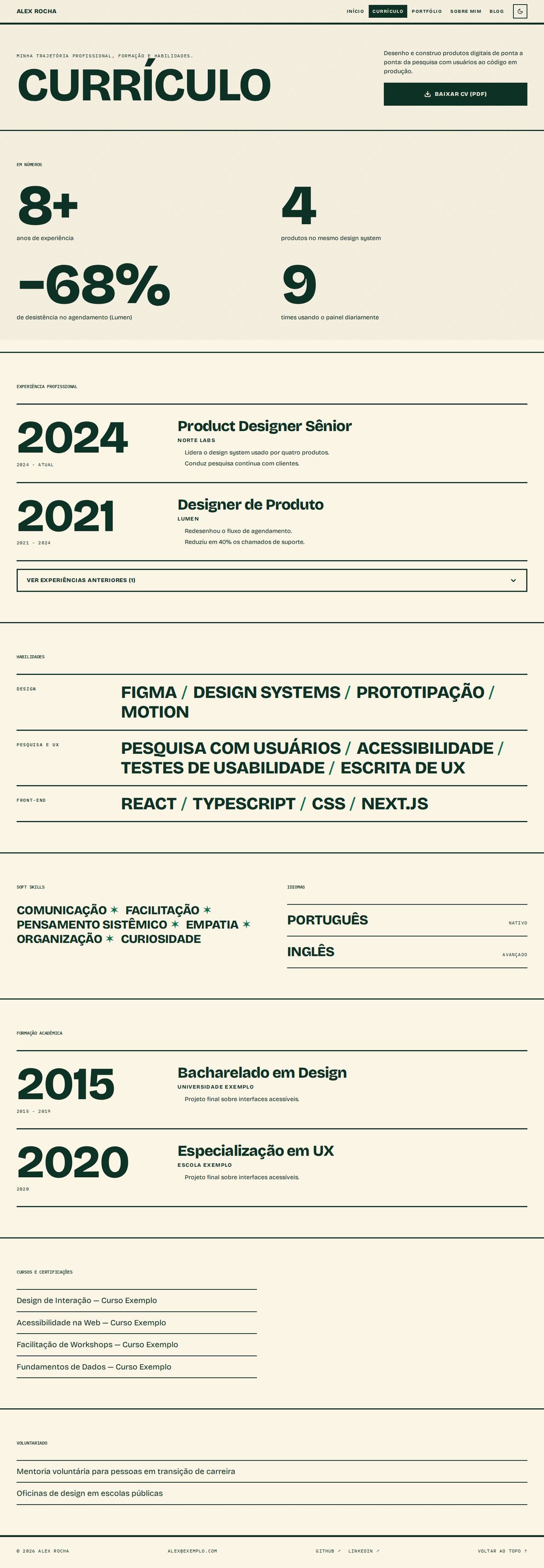
- Header with a giant "CURRÍCULO", the summary (first paragraph of "about") and "BAIXAR CV (PDF)" (DOWNLOAD CV) as a solid block.
- Highlight numbers (the same as on Home).
- Experience timeline: the giant start year as an anchor, the period in mono, role, company and description beside it. Older ones sit behind "ver experiências anteriores" (see earlier experience).
- Skills by group ("Grupo" field in the admin) in large words separated by slashes, with no numeric levels.
- Soft skills as words and languages with the level in mono; education on the same timeline; courses, certifications and volunteering in ruled lists. Each block disappears when empty.
Portfolio
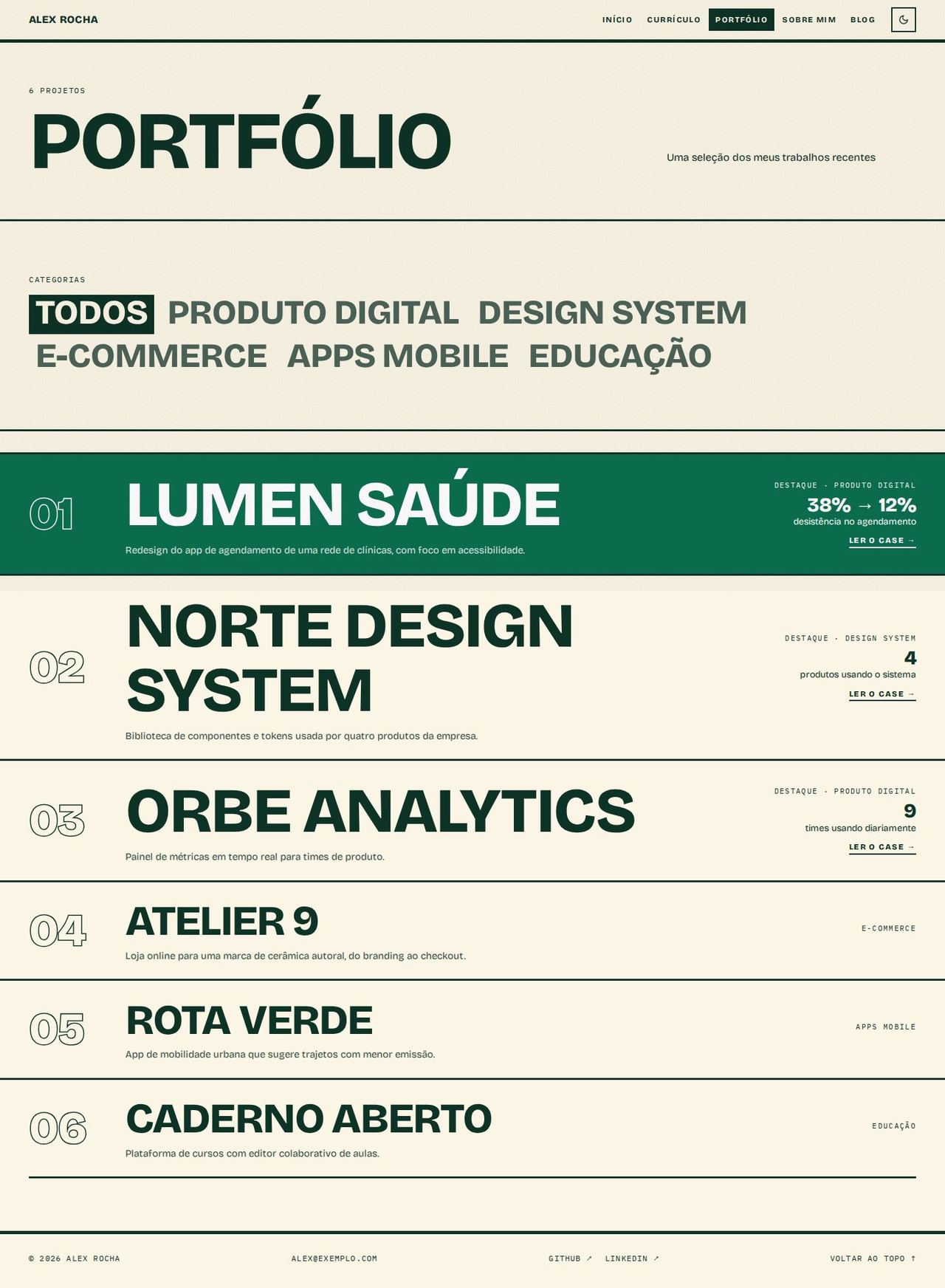
- Header with a giant "PORTFÓLIO" and the project count.
- Categories as large clickable words ("Todos" (All) + the categories); the active one sits in an inverted block. Without categories, the filter disappears.
- All projects as poster rows: the first 3 (with no filter) with a larger title and the "Destaque" (Featured) mark; description, category and the case's first metric.
- Only one action per row: "Ler o case →" (Read the case) when there is a case, otherwise "Ver projeto ↗" (See project; opens the project link). With neither, the row isn't clickable.
About
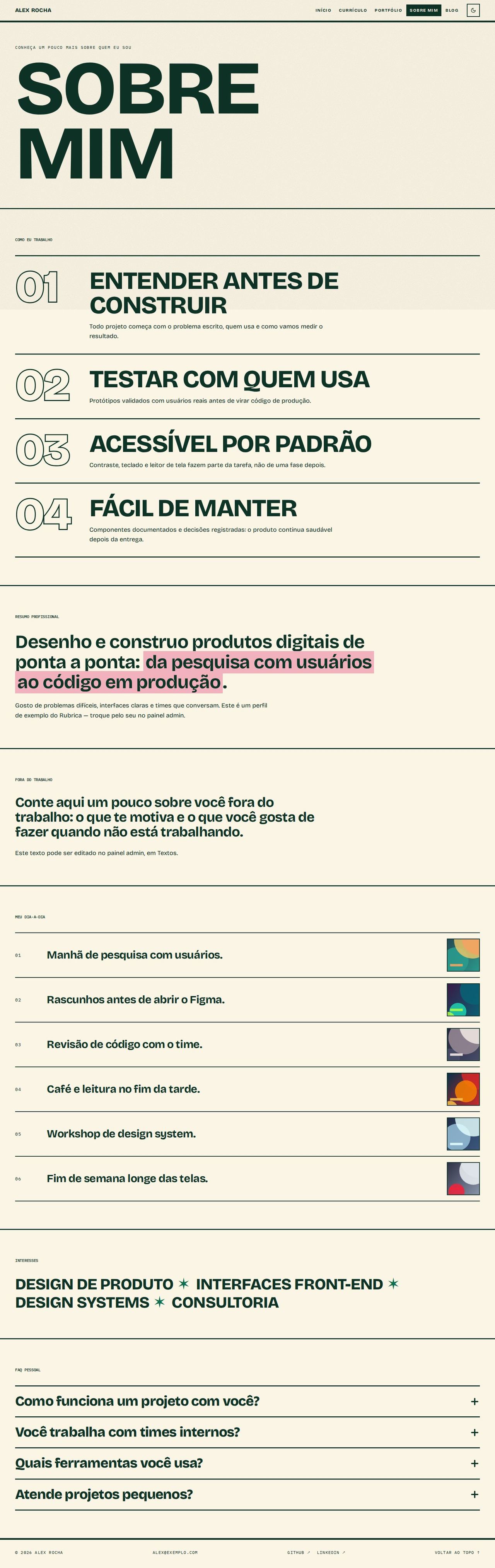
- Header with a giant "SOBRE MIM" (ABOUT ME).
- "Como eu trabalho" (How I work) opens the page: numbered principles with the number in outline and the title at poster size.
- Professional summary as a large statement with highlighter; "Fora do trabalho" (Outside work) as a medium statement.
- My day to day in numbered rows, with a small photo on the right.
- Interests (the Home services) in large words.
- FAQ as an accordion (
<details>), large questions and a rotating "+".
Blog
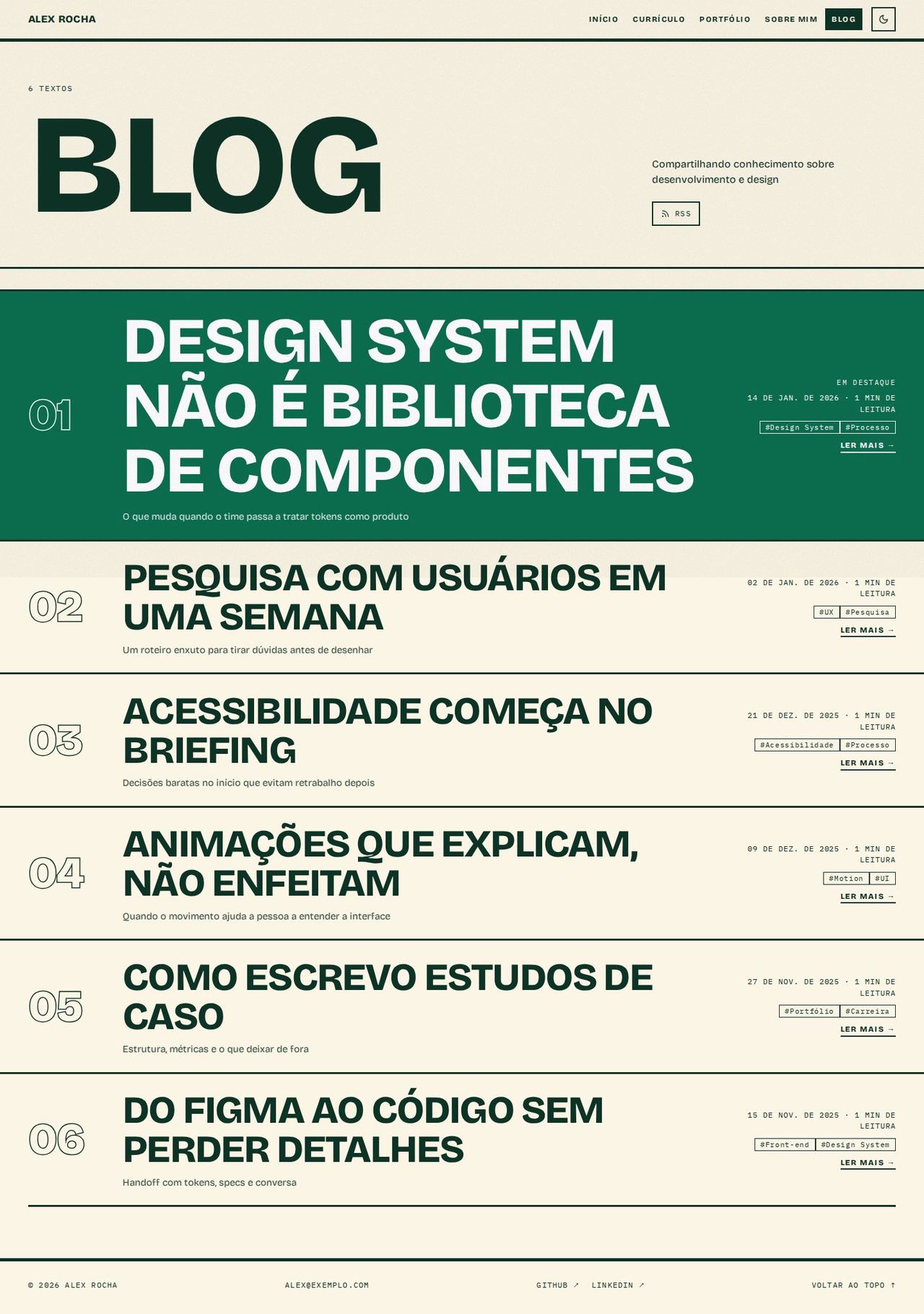
- Header with a giant "BLOG", the post count and the RSS link.
- Posts as giant headlines in rows: the featured post first (larger, with "Em destaque", Featured), then the others. Date and reading time in mono, up to 3 tags and "Ler mais →" (Read more; opens
/blog/<slug>).
Known limitations
- The type fitting uses an average letter width per font (
K_CAPS/K_NUMinPosterShared.tsx), calibrated for Bricolage Grotesque. With a much wider font, long words can break in the middle (without overflowing the screen); adjust the constants if you change the font. - Browsers without container units (
cqi) use aclamp()size based on the screen width, which is less precise. - The outline uses
paint-orderto hide the internal overlaps of the variable font's glyphs; browsers without that support show small strokes inside some letters. - The first poster row stays filled when nothing is under the mouse; on touch screens, the tapped row stays filled until you tap another.
- There is no search or tag filter on the blog.